
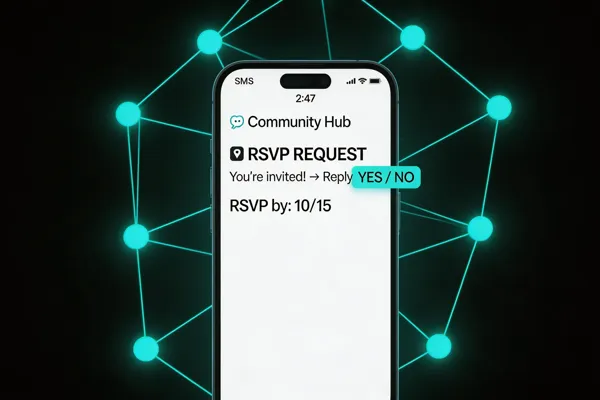
Why SMS RSVP is a Game‑Changer for Community Events
SMS RSVP delivers an eye‑opening open rate—over 95 % in the United States—far surpassing email’s 20‑30 % and ensuring that invitations are seen almost instantly. The two‑way nature of text messaging lets nonprofits, schools, and other community groups collect attendance confirmations with a single "YES" or "NO" reply, dramatically cutting the labor needed for phone‑call follow‑ups and paper cards. Because texts require no printed materials, organizers save on postage, paper, and printing costs while also reducing waste, supporting sustainability goals. However, compliance is essential: the TCPA mandates explicit opt‑in consent before any RSVP text is sent, and every message must include an easy opt‑out option such as replying "STOP." Proper consent management and record‑keeping protect both the organization and its guests, making SMS RSVP a powerful, responsible tool for boosting participation and streamlining event logistics.
Understanding RSVP Basics and Etiquette
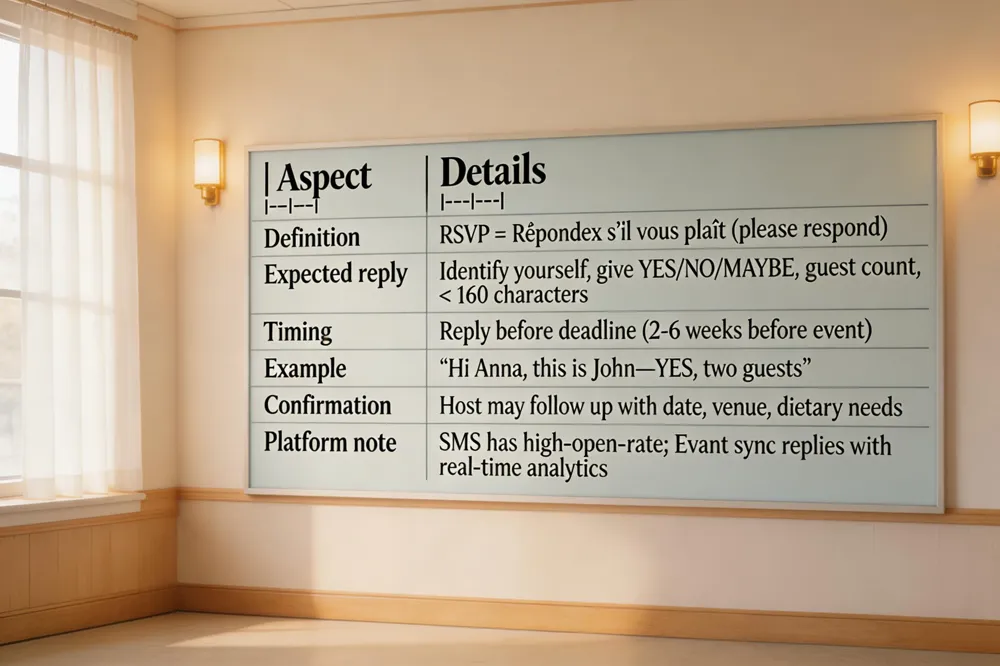
RSVP, short for the French “répondez s’il vous plaît,” means “please respond.” When a host invites you to reply by text, a quick, polite SMS is the appropriate etiquette—reply the way you were invited. To RSVP via text, identify yourself, give a clear answer (YES, NO, MAYBE), and note the number of attendees (e.g., “Hi Anna, this is John—YES, two guests”). If you need more details, ask briefly; keep the message under 160 characters. A proper confirmation reply might read: “Thanks for confirming! We’re excited to have you on July 12 at the community hall. Let us know any dietary needs or a plus‑one.” Send your reply before the deadline (typically 2‑6 weeks before the event) to help organizers finalize headcounts, seating, and catering. SMS remains a reliable, high‑open‑rate channel for nonprofits and community groups, and platforms like Evant integrate these replies with real‑time analytics, ensuring efficient event planning.
Crafting Effective SMS Invitations and Templates
![| Component | Recommended Content |
|---|---|
| Greeting | Friendly start (e.g., “Hi [Name]”) |
| Event details | Name, date, time, location in one line |
| RSVP request | Ask for “YES”, “NO”, or “MAYBE” plus guest count |
| Special‑need note | Optional short line for dietary or accessibility requests |
| Deadline | Clear date/time by which a reply is needed |
| Opt‑out | Include “STOP” to unsubscribe |
| Confirmation note | Thank‑you line and promise of follow‑up |
| Example template | "[Event] – [Date] at [Time] – [Location]. Reply YES, NO, or MAYBE and guest count (e.g., “YES, 2”). STOP to opt‑out. Thanks!" |](https://cdn.prod.website-files.com/68a34a9578911bbeedab4b32/69b4fc6f45a30bbde408b979_71ca44a3-b739-4ec2-852d-aaa81ff42e84-banner-77fc860c-3048-47bf-9876-972d07f7e19d.webp)
SMS RSVP guide template
Start with a friendly greeting, event name, date, and location. Ask guests to reply “YES”, “NO”, or “MAYBE” plus guest count, include any special‑need request, set a clear deadline, and add a “STOP” opt‑out line. End with a thank‑you and note a confirmation will follow.
How to create an RSVP text?
State your name, give a clear answer (YES/NO/MAYBE) and the total number of attendees. Keep it brief; add a short note only if needed.
What is an example of RSVP text?
“Hi [Name], you’re invited to Community Impact on June 15 6 PM Main Hall. Reply YES or NO; if YES, add guest count. Thanks!”
RSVP text example
- “Hi Emily – YES – 2 guests. Can’t wait for the fundraiser May 20!”
- “Hey Team, I’m in! Count me and my partner for the volunteer June 5.”
- “I’d love to attend the workshop July 12. I’m gluten‑free.”
- “Sorry, I can’t make the gala August 3.”
- “Can I bring a plus‑one to the community picnic Sept 18?”
Community event SMS RSVP template
[Event] – [Date] at [Time] – [Location]. Reply YES, NO, or MAYBE and guest count (e.g., “YES, 2”). Include any brief reminder (e.g., “Bring a mask”).
How to RSVP via text for a birthday party
Text the short code with “YES 2” (or “NO”) and any required details, then wait for a confirmation text.
How to RSVP via text for baby shower
Send “Hi [Host] – YES – 2 guests – baby‑sprinkle gift” (or a polite “Sorry, I can’t attend”).
RSVP by text message wording for wedding
“Hi [Name], we’ll be there on [Date] with [Number] guests. Excited!”
How to RSVP via SMS?
Text the keyword (YES/NO) to the provided short code, include guest count or special requests if asked, and confirm receipt via the automated reply.
Technical Setup, Integration, and Scaling
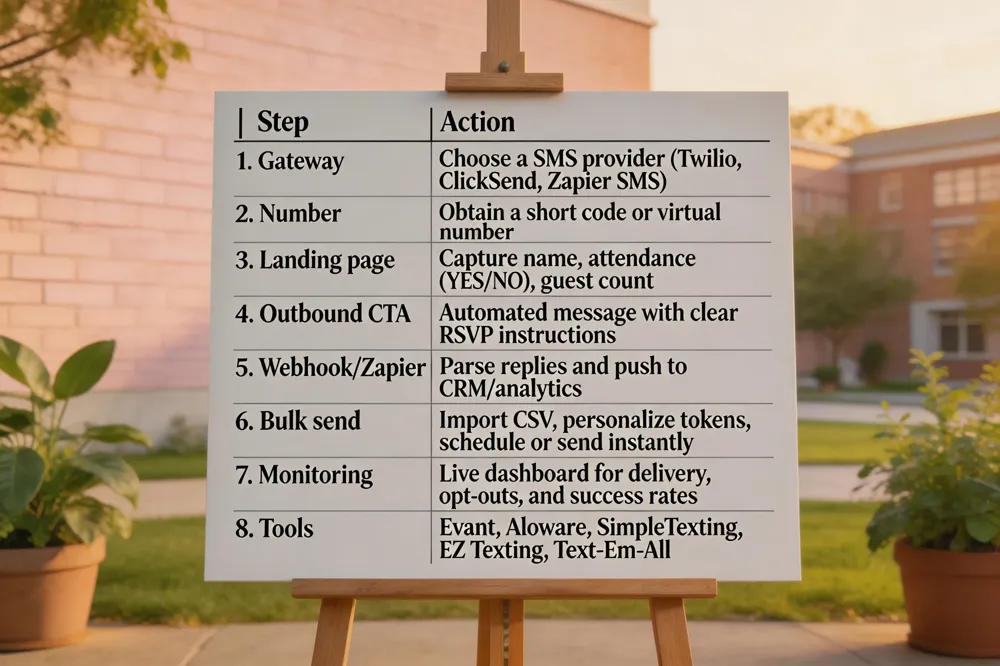
To implement SMS RSVP online, connect a gateway (Twilio, ClickSend, or Zapier’s SMS) to the Evant dashboard, obtain a short code or virtual number, and create a simple RSVP landing page that captures name, attendance (YES/NO), and guest count. Configure an automated outbound message with a clear CTA, then use a webhook or Zapier to parse replies and sync them in real time with your CRM and Evant analytics.
Sending 5,000 texts at once is straightforward in Evant: import the CSV list, personalize with tokens, select a compliant short code, schedule or send instantly, and monitor the live delivery dashboard for success rates and opt‑out requests.
Top SMS event‑management tools include Evant (native RSVP, check‑in, CRM sync), Aloware (AI‑driven reminders), SimpleTexting (user‑friendly campaigns), EZ Texting, and Text‑Em‑All. For businesses seeking a free starter, Twilio’s trial credits, TextMagic’s 30‑day trial, SimpleTexting’s 14‑day plan, or Google Voice provide low‑volume messaging without upfront cost.
Compliance, Legal Landscape, and Best Practices
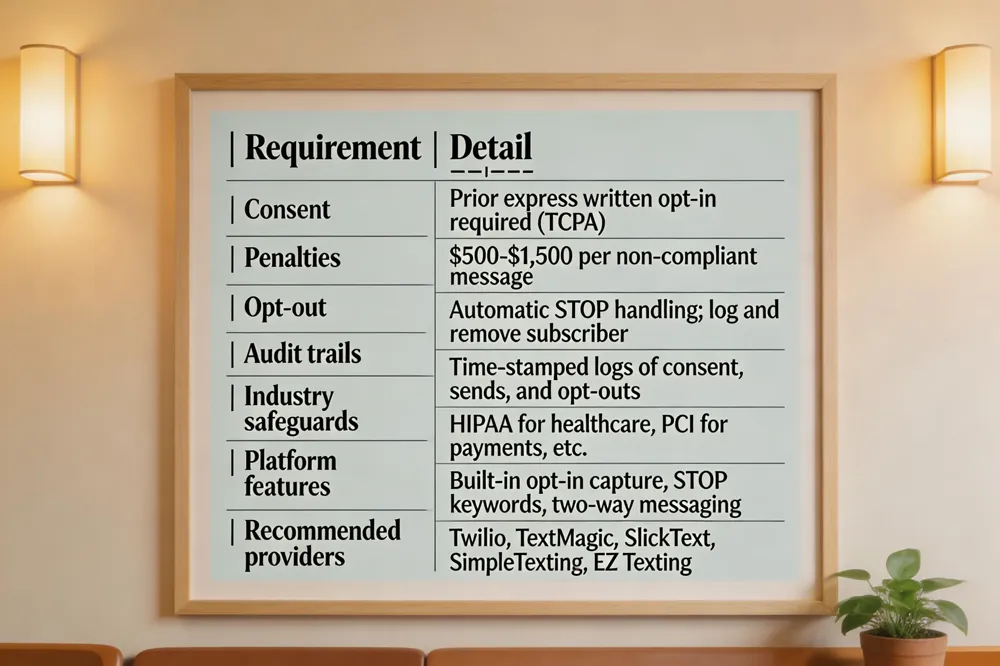
In the United States, SMS blasting is legal only when every recipient has given prior express written consent (opt‑in) as required by the TCPA. Violations can carry penalties of $500‑$1,500 per message, so nonprofits and schools must document consent and honor opt‑out requests promptly. Bulk‑texting platforms such as Twilio, TextMagic, SimpleTexting, SlickText, and EZ Texting provide built‑in opt‑in capture, STOP keywords, and audit trails to meet these requirements. Industry‑specific compliance—whether for education, healthcare, or charitable fundraising—demands additional safeguards like HIPAA or PCI data‑privacy controls, which leading providers now embed. Opt‑out handling should be automatic, with each STOP request logged and the subscriber removed from all future campaigns. Audit trails—time‑stamped logs of consent, sends, and opt‑outs—protect organizers from liability and enable reporting to regulators. Top SMS marketing platforms (Twilio, TextMagic, SlickText, SimpleTexting, EZ Texting) offer two‑way messaging, automated RSVP widgets, and CRM integrations, making them ideal for community‑event organizers seeking both compliance and engagement.
Optimizing Attendance with Reminders, Analytics, and Follow‑Ups
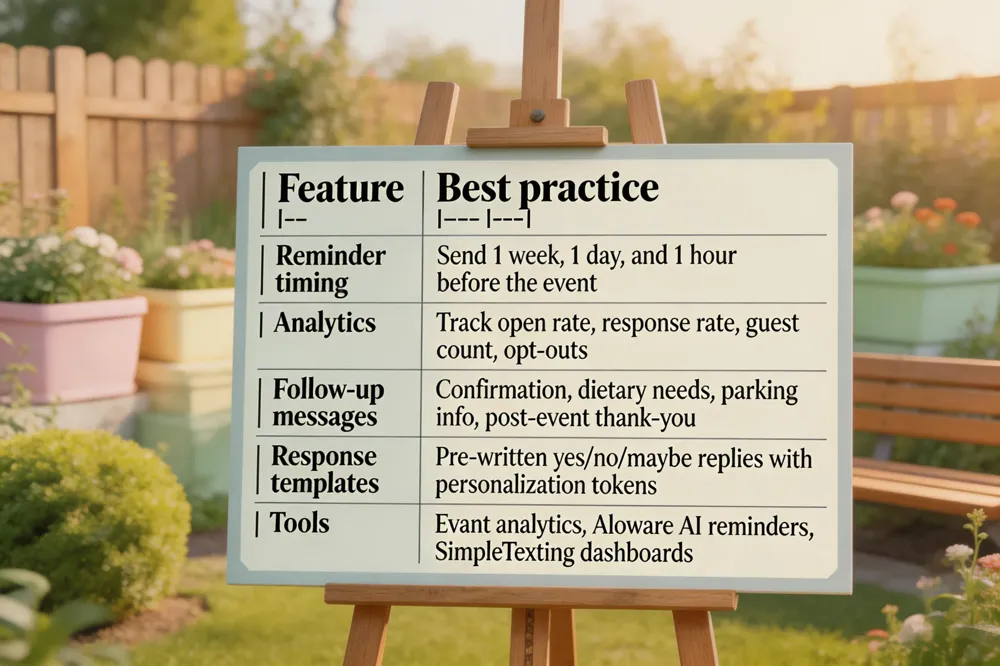
How to properly RSVP via text? Identify yourself, state “Yes/No/Maybe,” and note guest count (e.g., “Hi Sarah, Alex – YES – 2 guests”). Keep it short and polite.
Response to RSVP yes – Thank you! We’re excited to see you on [Date] at [Location]. Let us know any dietary needs; a reminder will follow.
How to RSVP via SMS? Text the provided keyword (YES/NO/MAYBE) to the short code or number, include guest count, and any required details.
Best SMS event management tools – Evant for native RSVP and analytics; Aloware for bulk broadcasting with AI reminders; SimpleTexting, EZ Texting, and Text‑Em‑All for cost‑effective, compliant campaigns.
Advanced Use Cases, Future Trends, and Additional Resources

Contests and giveaways via SMS turn a simple RSVP into an engagement engine. Guests text a keyword to a short code, instantly logging their entry; automated confirmations include opt‑in language and prize‑claim links. Platforms like Evant let organizers set rules—daily draws, random winners, or "every 10th entry"—and automatically select and notify winners while staying TCPA‑compliant.
QR‑code check‑in streamlines on‑site registration. After an SMS RSVP, a unique QR code is sent; scanning it at the venue updates attendance in real time and can trigger follow‑up messages (e.g., parking info). This hybrid approach merges mobile convenience with paper‑free check‑in.
Free PC‑based SMS tools keep organizers connected without a phone. Google Voice, MightyText, MySMS, Windows 10 "Your Phone," and the "SMS from PC" app (CIT.CZ) let users send and receive texts from a computer, supporting bulk messaging and quick replies at no cost.
Beyond RSVP, SMS keeps guests informed: automated reminders, schedule changes, dietary‑preference polls, and post‑event thank‑you texts maintain engagement throughout the event lifecycle.
FAQs
- How do SMS to win contests work? Participants text a designated keyword to a short code; the system logs the entry, sends a confirmation with opt‑in language, and uses rule‑based automation to pick winners, notifying them via personalized texts while offering opt‑out options.
- Free SMS software for PC includes Google Voice, MightyText, MySMS, Windows 10 "Your Phone," and CIT.CZ's "SMS from PC," all of which sync with a mobile device to send/receive texts from a desktop.
- How to tell guests to RSVP online? Add a short URL or QR code to invitations that links to an online RSVP portal (e.g., Evant), and clearly state the RSVP deadline and required details.
- Is SMS getting phased out? No—SMS remains essential for time‑critical alerts and RSVPs in the U.S., though richer messaging (RCS, chat apps) is growing; platforms continue to leverage SMS for its reliability and ubiquity.
Putting It All Together: A Strategic Roadmap for Community Event Success
SMS RSVP delivers a 98%+ open rate, instant headcounts, and low‑cost, paper‑free communication—perfect for nonprofits that need accurate catering, seating, and budget forecasts. To launch, start by cleaning your guest list, obtaining explicit TCPA opt‑in consent, and uploading contacts to a compliant platform such as Evant, Save This Date, or Trumpia. Draft a concise 160‑character invitation that includes event name, date, location, a short keyword (YES/NO/MAYBE), and a short code or virtual number. Schedule the initial blast 6‑10 weeks out, a reminder 3‑5 days before the RSVP deadline, and a final nudge 24‑48 hours before the event. Automate confirmation replies and follow‑up questions (e.g., meal choices) to keep data in real time. Continuously monitor delivery, response, and opt‑out metrics; adjust timing or wording based on A/B test results. Keep compliance front‑and‑center by maintaining opt‑in records, offering a clear STOP option, and respecting 10DLC registration requirements. Finally, future‑proof your communications by integrating SMS data with your CRM, enabling calendar sync, QR‑code check‑ins, and multi‑channel reminders that keep your community engaged and your events reliably staffed.
Related Blogs
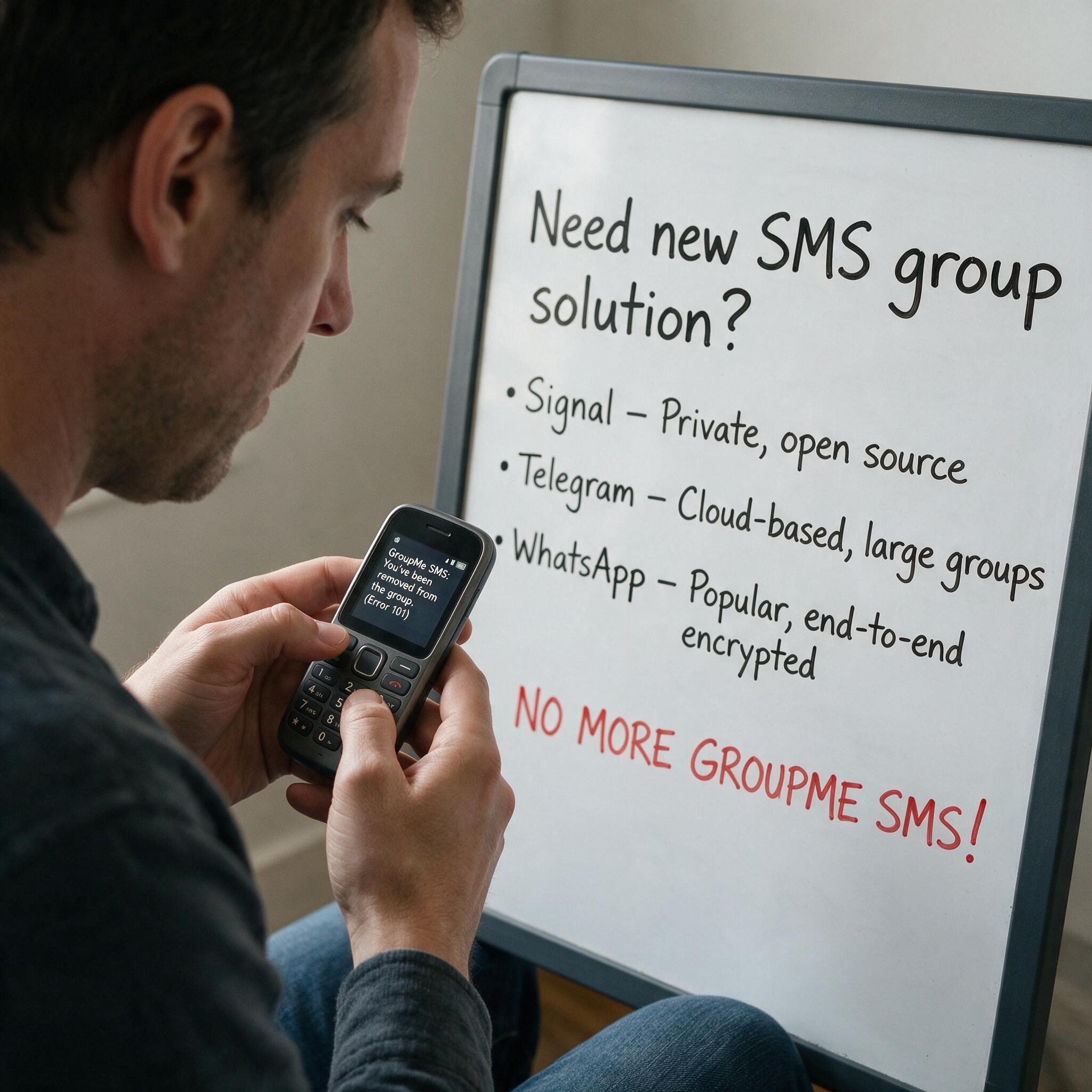

Got Kicked Out of GroupMe? Look to Evant.
Michael PedoeemGot Kicked Out of GroupMe? The Best GroupMe SMS Alternative for Jewish Communities

How to Send Targeted Alerts During Live Events
Michael PedoeemMastering Targeted Event Alerts: Real-Time Communication Strategies for Nonprofits
Top 7 SMS Trends for Communities in 2026
Michael PedoeemFrom AI-powered responses to text-to-donate and two-way texting — here are the 7 SMS trends every shul, school, and nonprofit needs to know about in 2026