
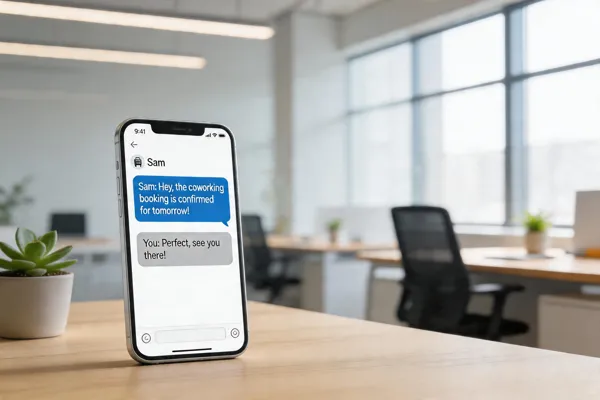
The SMS Advantage for Community Events
Picture this: you fire off a text invitation and within seconds 90‑98 % of recipients have already seen it. SMS works on every mobile phone—smartphones or basic feature phones—so you’re not betting on internet access or a fancy app. The cost is pennies per message (≈ $0.0075‑$0.01), a fraction of the $0.50‑$1.00 it takes to print, stamp, and mail a paper card, and you slash the carbon footprint of thousands of sheets of paper. As guests reply with a simple "YES" or "NO," the platform logs each response in real time, auto‑syncing to your CRM so you instantly know who’s coming, who needs a reminder, and any special notes like dietary restrictions. No more manual tallies, transcription errors, or delayed headcounts—your team saves hours, and the automated reminders push attendance up 15‑30 % while nipping no‑shows in the bud.
Instant Delivery and Near‑Perfect Open Rates
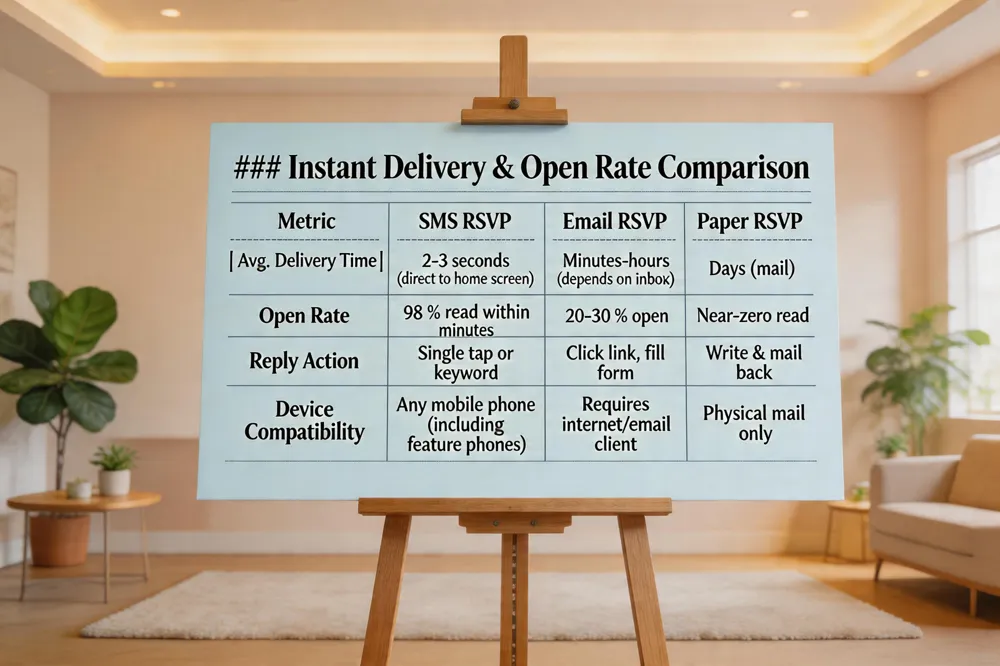 SMS invitations hit the inbox in 2‑3 seconds and explode open rates—studies by the Mobile Marketing Association and a 2023 Evant internal report show 98 % of texts are read within minutes, dwarfing the 20‑30 % email open rate and the near‑zero response rate of mailed paper cards. The magic of text messaging is its universality: a simple + keyword reply works on any mobile device, even basic feature phones that lack a data plan or internet connection. Because the message lands directly on the home screen, guests can RSVP with a single tap while commuting, waiting in line, or lounging on the couch—no need to open an email, click a link, or hunt for a paper card. This speed translates into real‑time headcounts, letting organizers adjust catering, seating, and staffing on the fly.
Is RSVP still used today? Absolutely. RSVP remains the standard request for a response. Modern platforms like Evant have transformed it into an instant, mobile‑first interaction, turning a traditional etiquette into a data‑driven engagement tool.
Cost Savings and Environmental Impact
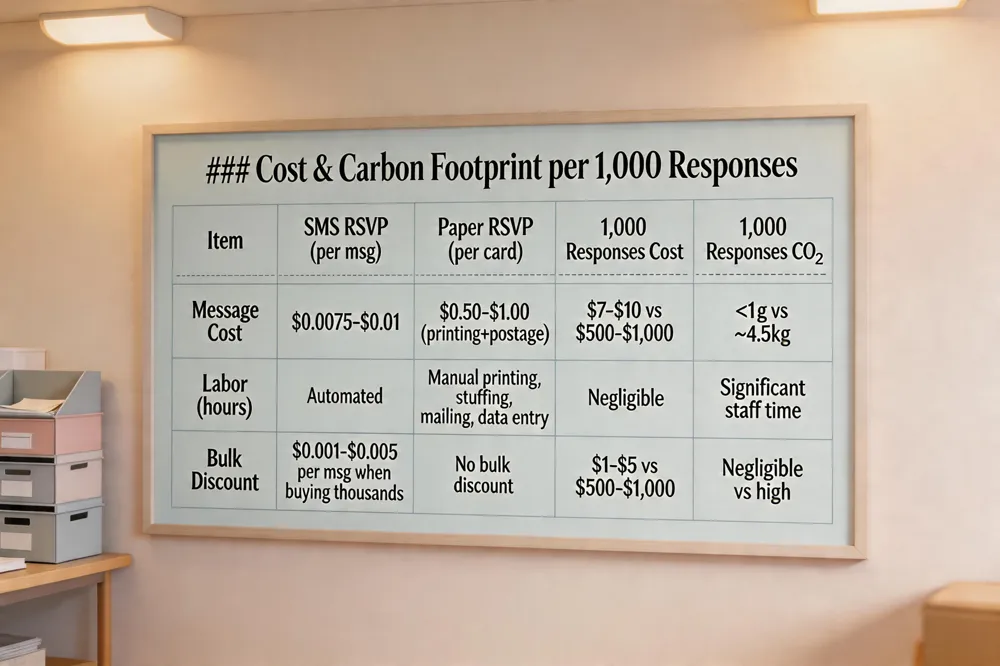 When you compare a $0.0075‑$0.01 SMS RSVP with a $0.50‑$1.00 paper card, the math is crystal clear: text messaging slashes per‑response costs by 90‑98 %. Bulk pricing drives the fee even lower, turning a $0.01 message into pennies when you buy thousands of credits—a sweet spot for nonprofits that send hundreds of invites.
Beyond the dollar sign, SMS wipes out the hidden labor of printing, stuffing envelopes, mailing, and then manually transcribing handwritten replies. Those staff hours vanish, and so do the errors that creep in when you copy‑paste from paper.
Environmental stakes are just as compelling. A single sheet of printer paper emits about 4.5 g of CO₂; sending 1,000 paper RSVPs adds roughly 4.5 kg of carbon to the atmosphere. An SMS, by contrast, emits less than 0.001 g per message—practically negligible.
Paper forms vs SMS RSVP cost – Paper cards require printing, postage, and manual entry, turning each response into a costly, labor‑intensive event. SMS replaces those fixed costs with a predictable, sub‑cent fee that shrinks further with bulk credits, eliminating both material and staff expenses.
Free event RSVP – Evant’s free tier lets nonprofits collect unlimited SMS RSVPs, auto‑update guest lists, send confirmations, and sync with CRMs at zero cost, covering everything from invitations to check‑in.
Free community event RSVP – Community groups can leverage the same free tier: personalized texts, real‑time counts, QR‑code check‑ins, and analytics—all without paying a dime, making SMS the budget‑friendly, eco‑smart choice for any event.
Real‑Time Analytics, CRM Sync, and Seamless Check‑In
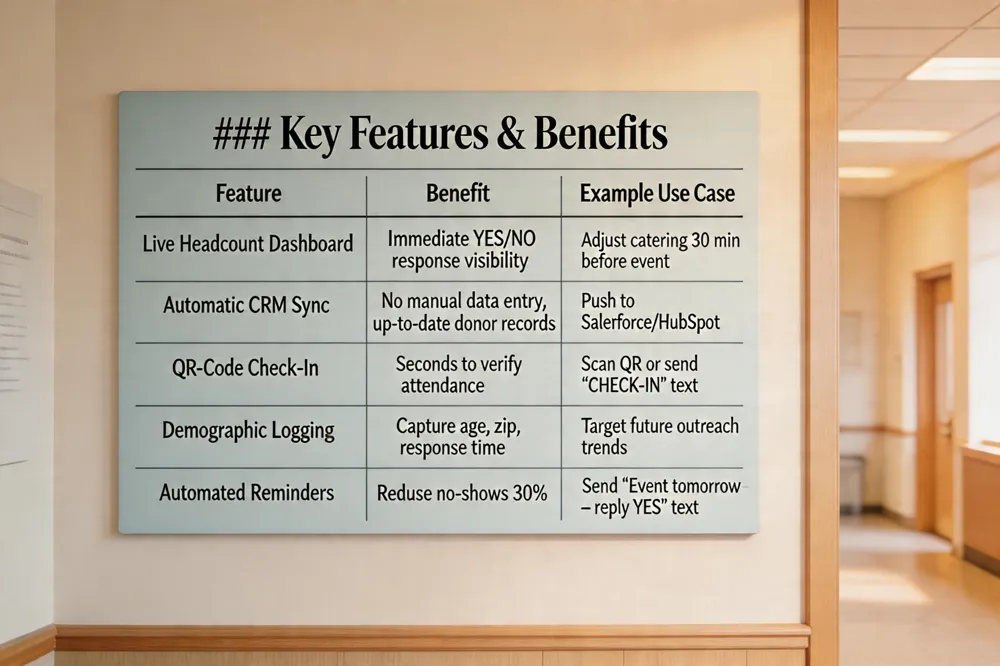 Live headcount dashboards give organizers a pulse on attendance the moment a text arrives. Every “YES” or “NO” updates a visual tally, letting planners adjust catering and seating instantly. Automatic CRM integration pushes replies into Salesforce, HubSpot, Blackbaud or other systems, eliminating manual entry and keeping donor records current. Instant check‑in works with a QR code scanned at the door or a simple “CHECK‑IN” text, cutting entry time to seconds. The platform logs response times, ages, zip codes and other demographics, helping nonprofits spot trends and target outreach.
RSVP website for events – A dedicated site centralizes responses, but SMS‑driven tools like Evant turn each reply into a rapid, reminder and check‑in, ideal for schools and charities where texting beats email.
Best RSVP website free – Evant’s free tier offers a mobile‑optimized RSVP link, unlimited texts and basic analytics at no cost. Other free options exist but lack built‑in SMS and CRM sync.
Eventbrite RSVP – Eventbrite provides a RSVP and ticketing dashboard, yet it does not natively support SMS replies. Pairing it with Evant adds text‑based RSVP, keeping the guest list synced and boosting attendance.
Avoiding Common RSVP Mistakes and Crafting Effective Invites
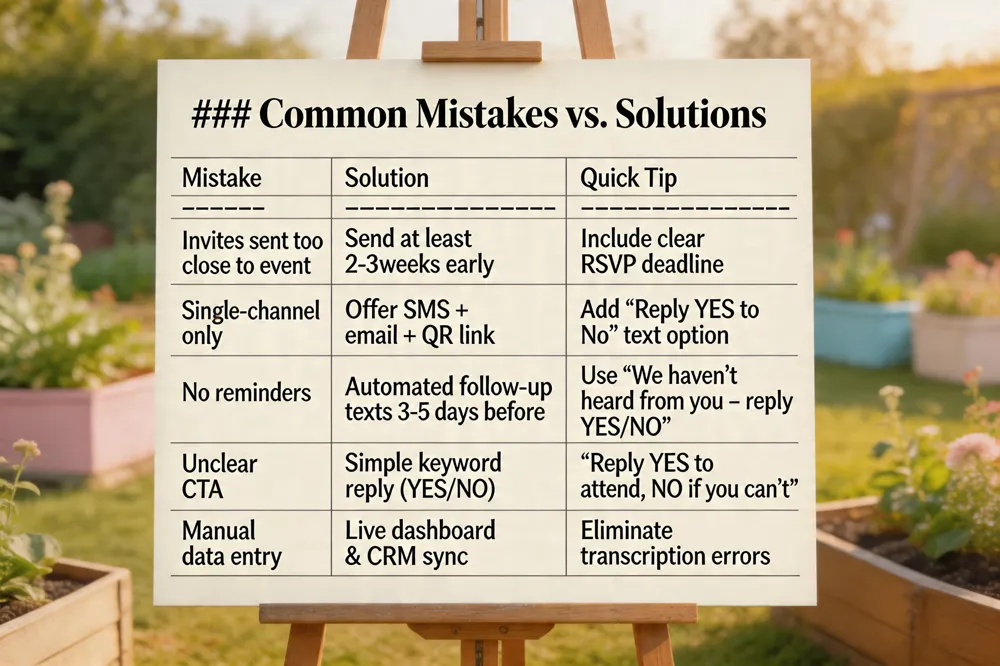 What are common RSVP mistakes? Sending invites too close to the event, unclear deadlines, relying on a single channel, and forgetting automated reminders are the biggest pitfalls. Guests often overlook a request when a text lands in a crowded inbox, and without a live dashboard duplicate or lost replies slip through the cracks. How to write an RSVP for an event? Lead with the event name, date, time, and venue, then a clear call‑to‑action like “Reply YES to attend or NO if you can’t.” Ask for plus‑ones or dietary notes, set a firm response deadline, and include a simple reply method—SMS works on any phone, even without internet. How do you properly RSVP for a party? Respond promptly, preferably within a few days, using the host’s preferred channel (text is fastest). State “YES, 2 guests” or “NO” and keep the tone courteous. Is it okay to have a wedding reception RSVP via text and email? Absolutely. Text messages have a 98 % open rate and are read within minutes, while email offers a backup for those who prefer it. Offering both lets every guest respond easily, and platforms like Evant combine all replies into a real‑time dashboard, cutting paper waste, lowering costs, and boosting attendance.
Platform Comparisons and Templates

Is Google Forms good for RSVPs?
Google Forms is free and easy to set up, letting you collect names, emails, attendance choices, and notes. It works on desktop and mobile, but it lacks built‑in SMS notifications, automated reminder texts, and real‑time check‑in. Syncing responses to a CRM requires manual steps or third‑party add‑ons. For nonprofits or schools that need instant text confirmations, nudges, and live analytics, an SMS‑first platform like Evant provides a smoother, automated experience.
Create RSVP link for event
In Evant, open the Event Dashboard, click Create Event, fill in details, then select Generate RSVP Link. The system creates a short, mobile‑friendly URL (e.g., https://evant.app/xyz) that can be shared via SMS, email, or social media. The link opens a responsive form, logs replies in real time, and triggers an instant confirmation text. You can customize the slug to match your event name for a clean look on printed invites.
Community event RSVP template
SMS RSVP Template
"Hi [Name], you’re invited to [Event Name] on [Date] at [Time] [Location]. Reply YES to reserve your spot or NO if you can’t attend. For details, text [Phone] or visit [Short URL]."
Online RSVP Form (for email/web)
- Name
- Phone (optional)
- Attendance (Yes/No/Maybe)
- Notes (dietary, volunteer interests)
When a guest replies, Evant records the response, sends a confirmation, updates the live headcount, and syncs the data with your CRM for easy follow‑up.
The Best Way to RSVP Today
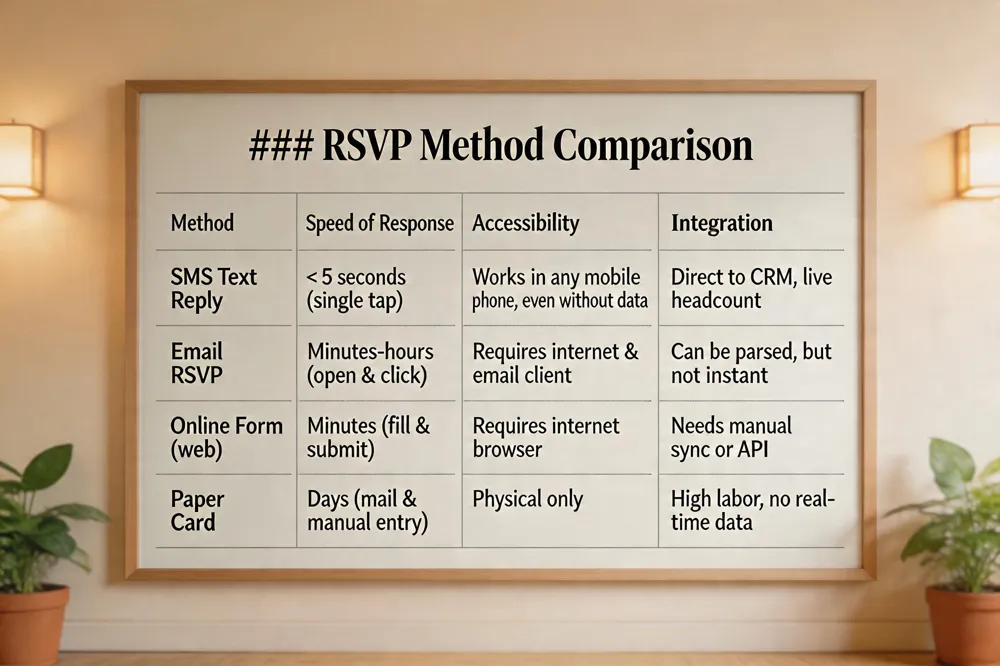 Text‑reply simplicity is the core of modern RSVP. Guests receive a short SMS, tap “YES”, “NO”, or “+2” and the system instantly logs the response. No internet, no forms, no paper—just a single tap on any mobile phone, even a basic feature phone.
Instant confirmation and analytics follow the reply. Platforms like Evant push a confirmation message, update a live head‑count dashboard, and sync the data to your CRM in real time. Organizers see who’s coming, dietary notes, and peak reply times without manual transcription, and automated reminders can be scheduled to cut no‑shows by up to 30 %.
Hybrid options for non‑text users keep everyone included. The SMS can embed a short link to an online RSVP form for guests who prefer a web interface, and QR codes on printed invites can launch the same flow. This dual path preserves accessibility while keeping data in one place.
Future‑proof, data‑driven engagement means every RSVP becomes a data point. Real‑time analytics enable dynamic staffing, catering adjustments, and post‑event surveys that feed back into donor or student records. In short, a text‑reply RSVP combines speed, accuracy, and seamless integration—making it the best choice for nonprofits, schools, and community organizers.
Take the Next Step with SMS RSVP
If you’re ready to ditch paper cards and stop juggling spreadsheets, start with Evant’s free tier—no credit card, no setup fee, just a phone number and a guest list. In a few clicks you can blast a text invitation that lands on any mobile phone, even a basic feature phone, and watch replies roll in instantly. That alone slashes printing, postage, and handling costs to pennies per guest while eliminating the carbon footprint of thousands of sheets of paper. Because every reply is captured in a structured cloud dashboard, you get real‑time headcounts, dietary notes, and even wait‑list alerts without a single manual entry. Automated reminders keep your event top‑of‑mind, boosting confirmed attendance by 15‑30 % and cutting no‑shows dramatically. The result? A seamless, frictionless RSVP experience for every guest—whether they’re tech‑savvy or not—and a smarter, greener, and more affordable event workflow for your organization.