
5 Steps to Integrate Payment Collection Seamlessly with Your SMS RSVP Platform
Why Seamless Payments Matter
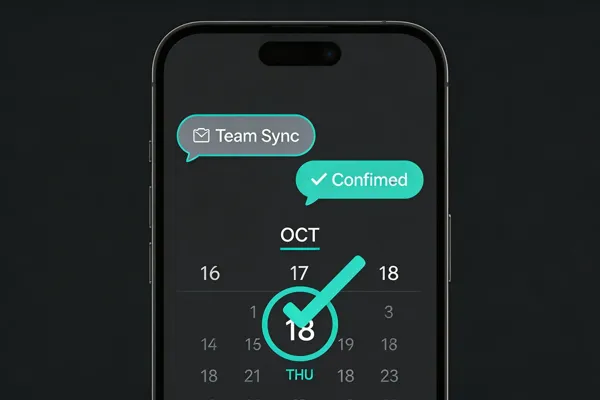
SMS reaches more than 95% of U.S. adults and enjoys open rates near 99%, so a payment link sent via text is seen instantly. When a RSVP confirmation includes a secure, tokenized payment link, donors and attendees can complete the transaction in seconds, eliminating the need for separate invoices or web portals. This immediacy accelerates event revenue—studies show that 60% of text‑based payment requests are paid within 48 hours, and real‑time integration with platforms like Stripe, PayPal, or GoCardless updates the organizer’s ledger instantly. For nonprofits and schools, the streamlined flow improves the donor experience: a single, PCI‑DSS‑compliant link reduces friction, delivers instant receipts, and keeps compliance records in one system. Faster cash flow, higher conversion rates, and a frictionless, mobile‑first interaction together boost participation and strengthen community trust.
Step 1 – Legal Review, Consent Management, and Secure Tokenized Links

Once consent is confirmed, the event platform (e.g., Evant) should embed single‑use, encrypted payment links—often called tokenized links—in the SMS invitation or follow‑up message. These links are generated by a PCI‑DSS‑Level 1 compliant gateway (such as Stripe, PayPal, or Payabl) and are valid for a short window (typically 15‑30 minutes), preventing reuse and reducing fraud. When a recipient taps the link, the gateway tokenizes the card data, authorizes the transaction, and instantly notifies the RSVP system, which updates the attendee’s payment status in real time.
How do you process integrated payments? Integrated payments in Evant are handled by embedding a secure payment processor directly into the event workflow, so donors or attendees can complete transactions without leaving the SMS or web interface. When a user initiates a payment, the processor captures the payment details, tokenizes and encrypts them, and then authorizes the transaction with the card network or bank. Once approved, the funds are transferred to your designated account and the transaction status is recorded in real time. Evant automatically synchronizes the payment data with its CRM and accounting integrations, updating attendee records, RSVPs, and financial reports instantly. This seamless flow eliminates manual entry, reduces errors, and provides up‑to‑date analytics on event revenue and participant engagement.
What is the SMS payment method? The SMS payment method, often called Text‑to‑Pay, lets a business send a payment request directly to a customer’s mobile phone via a text message. The message includes the amount due and a secure, mobile‑optimized link that takes the customer to a payment gateway where they can enter credit‑card, bank or digital‑wallet details. Once the payment is processed, the customer receives an instant confirmation text that serves as a receipt, and the business is notified in real time. Because the entire flow occurs on the phone, it removes the need to log in to a separate portal and speeds up checkout, which is especially useful for nonprofit event RSVPs and donations. The method is encrypted, compliant with payment‑industry standards, and can be integrated with CRM and analytics tools for streamlined reporting.
Step 2 – Choose and Integrate the Right Payment Gateway
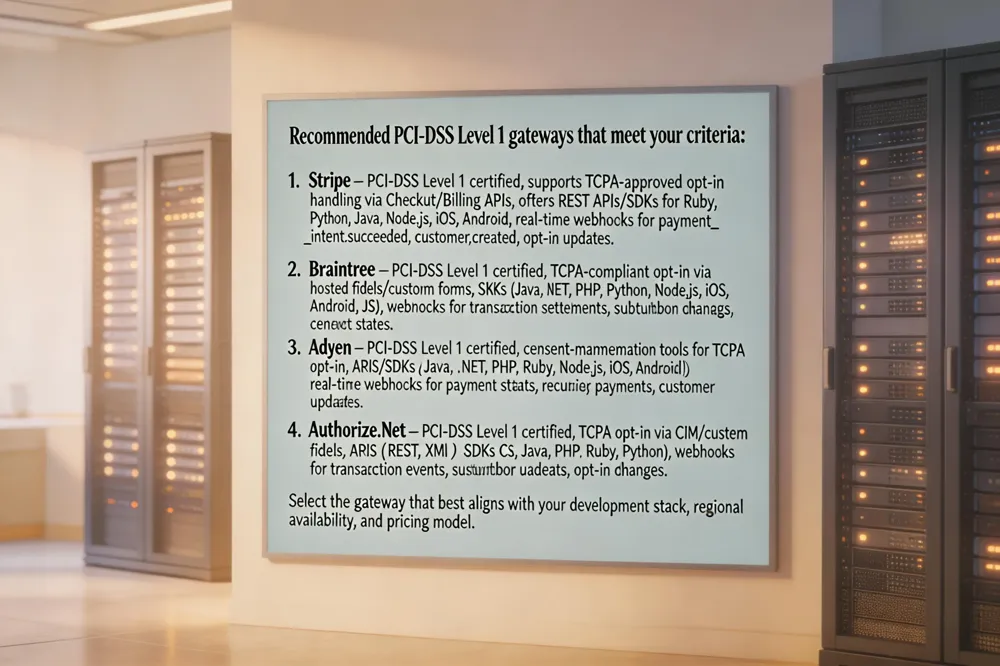
When adding payment collection to an SMS‑driven RSVP workflow, start by evaluating gateways against three core criteria: (1) security – the provider must offer PCI‑DSS Level 1 tokenization and host the card‑entry page to keep raw data out of your SaaS platform; (2) consent and compliance – support for TCPA‑approved opt‑in handling, opt‑out processing, and audit logging; and (3) integration ease – a robust API, SDKs for common languages, and real‑time webhook notifications that can be mapped to your event‑management system (e.g., Evant, RSVPify, ReEvent).
How can I integrate a payment gateway? First, open a merchant account with your chosen processor (Stripe, PayPal, etc.) and retrieve the public and secret API keys. Next, embed the provider’s SDK or JavaScript library into the SMS‑RSVP dashboard and configure a hosted checkout link that is generated for each confirmed guest. Map the checkout response to a webhook that updates the registrant’s status in your CRM, marking them as “Paid.” Test the full flow in the sandbox, handling success, decline, and refund callbacks before switching to live credentials. Finally, confirm that the integration uses tokenized payment data and never stores card numbers, satisfying PCI‑DSS requirements.
What are the top 5 best payment gateways? 1. PayPal – widely recognized, quick setup, supports cards and PayPal balances. 2. Stripe – flexible API, tokenization, extensive developer tools, and strong reporting. 3. Square – integrates online and in‑person sales, offers inventory and reporting features. 4. Braintree – a PayPal subsidiary with advanced fraud tools and support for digital wallets. 5. Adyen – global reach, robust tokenization, and built‑in compliance features for large‑scale nonprofits.
Step 3 – Build the SMS‑Based Payment Flow

A smooth SMS payment flow begins with link generation and delivery. After an RSVP is confirmed, the event platform (e.g., Evant, RSVPify, or a custom SaaS) calls a payment gateway API (Stripe, PayPal, Text Request, etc.) to create a secure, single‑use tokenized link or a short‑code payment. The link is shortened, added with,, and sent via SMS to the guest’s mobile number.
One‑time codes vs. direct links: Some providers (e.g., GoCardless, Text Request) issue a one‑time numeric code that the attendee replies with (e.g., “PAY 1234”). Others embed a direct payment URL that redirects the user to a PCI‑DSS‑compliant checkout page. Both methods are encrypted; the code approach reduces clicks, while the link provides a richer UI for selecting payment methods or donation amounts.
Real‑time status updates: The payment gateway fires a webhook the payment succeeds or fails. The event system captures the webhook, updates the RSVP record instantly, and triggers a follow‑up SMS (receipt, reminder, or error). This real‑time feedback eliminates manual reconciliation and lets organizers see live revenue dashboards.
How to pay via text message? The attendee receives the SMS, clicks the link or replies with the code, completes the checkout (or the charge posts to the phone bill), and receives a confirmation text.
How do SMS payments work? A business sends a text containing a secure link or short‑code; the recipient responds; a third‑party processor validates and encrypts the data, authorizes the transaction, deducts fees, transfers funds to the merchant, and updates any linked CRM or analytics tools—all within seconds.
Step 4 – Connect RSVP Responses to Payments

Conditional payment triggers are built on that response. After a guest replies “YES,” the platform can automatically send a follow‑up message that contains a secure, tokenized payment link (or a keyword like “PAY”). This link is single‑use, PCI‑DSS compliant, and generated in real time by a gateway such as Stripe, PayPal, or GoCardless. If the RSVP includes options (meal choice, ticket tier), the payment request can be customized per guest using conditional splits.
Real‑time CRM sync ensures that every RSVP and payment status updates the event’s database instantly. Webhooks from the payment processor push a “payment completed” event back to the RSVP system, which then marks the attendee as Paid and can trigger receipt texts, QR‑code tickets, or check‑in permissions.
How to RSVP via SMS?
- Receive the Evant invitation with the event name, date, and short‑code.
- Text the exact keyword or short‑code to the provided number.
- Get an automatic confirmation SMS that logs your attendance status and may ask for additional details.
- The response is stored in the event’s CRM, giving organizers a live headcount.
- As the event nears, reminders and updates are sent via SMS.
Does RSVPify accept payments? Yes. RSVPify integrates with Stripe, allowing guests to pay for tickets, donations, or add‑ons using any major credit card. Payments are processed securely through Stripe’s PCI‑DD compliant hosted checkout, so card data never touches RSVPify’s servers. Funds are typically transferred to the organizer within 48 hours of the transaction.
Step 5 – Test, Monitor KPIs, and Optimize Costs

After the sandbox phase, move to a controlled live rollout and use the same test scripts in a production environment to catch any latency or compliance gaps. Track the three core KPIs that matter to nonprofits: delivery rate (percentage of SMS messages that reach the handset), click‑through rate on the payment link, and payment‑completion rate (successful transactions versus clicks). Real‑time webhook updates from the gateway (Stripe, PayPal, or a Text‑to‑Pay provider) let you see these metrics on a dashboard and quickly adjust consent timing or message copy.
Cost analysis should start with the integration fee. Integrating a payment gateway typically involves a one‑time setup fee that can range from $0 (for DIY APIs) up to $5,000 – $10,000 for custom implementations or enterprise support. Most providers also charge an annual maintenance or subscription fee, often between $100 and $500, to cover updates, security patches, and technical support. Transaction‑level costs usually consist of a merchant discount rate (MDR) of 1.5 % – 2.5 % per sale plus a flat processor charge of $0.10 – $0.30 per transaction. Additional expenses may include settlement fees (often waived) and a $15 – $25 chargeback or refund fee when disputes arise. Exact pricing varies by gateway, transaction volume, and the level of service you select, so it’s best to request a detailed quote from the provider.
Use the KPI data to fine‑tune message frequency, segment high‑value donors, and negotiate lower MDR rates as volume grows, ensuring the SMS RSVP workflow remains cost‑effective and compliant.
Putting It All Together
Key takeaways:
- SMS reaches >95% of U.S. adults and yields 90%+ open rates, making it the most reliable channel for event outreach.
- Secure, tokenized payment links (PCI‑DSS Level 1) embedded in RSVP texts drive faster, on‑time payments and reduce call‑center workload.
- Integrated platforms like Evant, Replied App, or RSVPify combine RSVP tracking, meal counts, and real‑time payment status in one dashboard.
Next steps for your organization:
- Review consent records and ensure TCPA/Reg F opt‑in compliance.
- Choose a PCI‑compliant gateway (Stripe, PayPal, or a Text‑to‑Pay provider) and generate single‑use payment links.
- Build a compliant SMS invitation template with clear opt‑out language and a short link.
- Pilot the workflow with a small segment, monitor delivery, click‑through, and payment completion KPIs, then scale.
Additional resources and support:
- Pew Research Center mobile‑usage data; GoCardless, Payabli, and Text Request technical guides.
- Zapier integration templates for Evant ↔ Stripe or PayPal.
- Compliance checklists from CFPB, FDCPA, and state debt‑collection statutes.
- Vendor support portals (Replied App, RSVPify, Evant) for onboarding assistance.
Related Blogs


Got Kicked Out of GroupMe? Look to Evant.
Michael PedoeemGot Kicked Out of GroupMe? The Best GroupMe SMS Alternative for Jewish Communities

How to Send Targeted Alerts During Live Events
Michael PedoeemMastering Targeted Event Alerts: Real-Time Communication Strategies for Nonprofits
Top 7 SMS Trends for Communities in 2026
Michael PedoeemFrom AI-powered responses to text-to-donate and two-way texting — here are the 7 SMS trends every shul, school, and nonprofit needs to know about in 2026