
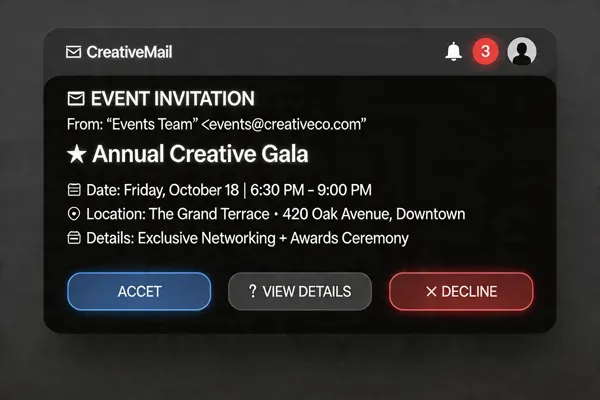
Why Automated Reminders Are a Game‑Changer
Automated reminder sequences slash no‑show rates dramatically—studies show reductions of 15‑72% when messages hit attendees at strategic moments like 1 day and 1 hour before an event. By spreading reminders across SMS, email, and voice, you meet people where they’re most responsive; SMS boasts a 98%% rate, while email adds depth and a calendar‑add button. Multi‑channel outreach also lets you segment by preference, ensuring each attendee gets the right tone at the right time. The real power comes from data‑driven optimization: dashboards track delivery, opens, clicks, and confirmations, letting you tweak timing, content, and channel mix in real time. Continuous monitoring turns every reminder into a learning loop, steadily boosting attendance and cutting manual workload.
Why Automated Reminders Matter
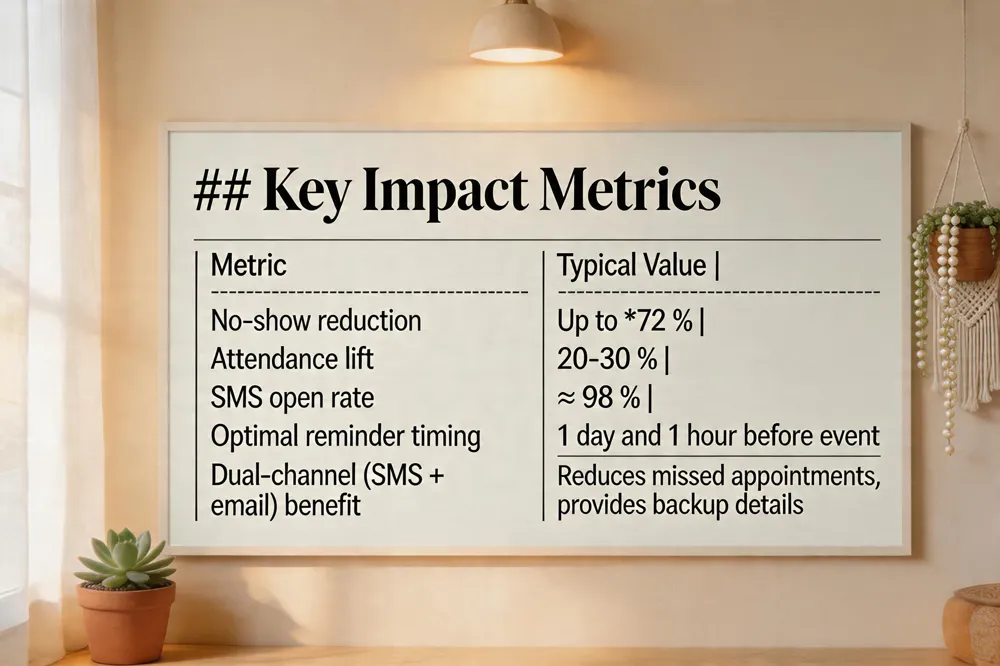 Automated reminder sequences are a game‑changer for nonprofits and schools. Studies show they can slash no‑show rates by as much as 72 % and lift overall attendance by 20‑30 % when SMS and email work together. The magic lies in timing and relevance: a well‑timed reminder—typically 1 day and 1 hour before the event—keeps the session top‑of‑mind, while a brief agenda preview or speaker highlight adds perceived value and nudges the registrant toward a firm RSVP.
SMS reminders for event attendees (email) – Platforms like Evant let you schedule an SMS that lands instantly on a participant’s phone and queue a matching email for inbox‑preferring contacts. Each message can pull in the attendee’s name, event title, date, location, and a short RSVP or QR‑code link. Because SMS enjoys open rates of 98 % and email provides a backup for detailed information, the dual‑channel approach dramatically reduces missed appointments. Analytics dashboards track opens, clicks, and replies, enabling targeted follow‑ups.
Increase event attendance with reminders – Nudging registrants at strategic moments—7 days out, 24 hours before, and a final 15‑minute alert—has been proven to raise turnout by 30‑50 %. Including a one‑click “magic link” or calendar‑add button removes friction, while a concise value hook (e.g., “Don’t miss the keynote on X”) builds excitement. Personalized, multi‑channel reminders turn passive sign‑ups into confirmed participants.
How can I increase attendance at events? – Start with a resonant theme, then blast the calendar through SMS, email, and social media. Offer early‑bird incentives, hybrid attendance options, and a mobile‑friendly RSVP. Use automated sequences to deliver reminders at the optimal intervals and follow‑up with a thank‑you text and short survey to cement loyalty.
What are some good strategies for improving attendance? – • Align messaging with community values and segment audiences for tailored content. • Schedule events on days with high engagement (mid‑week mornings). • Add incentives such as giveaways or exclusive content. • Leverage CRM integration to personalize reminders and track real‑time RSVP data. • Ensure compliance (TCPA, GDPR) with built‑in opt‑in/opt‑out management to maintain trust.
By combining instant‑high‑open‑rate SMS with richer email details, and by timing each touchpoint strategically, organizers can dramatically cut no‑shows, boost on‑time check‑ins, and keep attendees engaged long after the event ends.
Crafting the Perfect Reminder Message
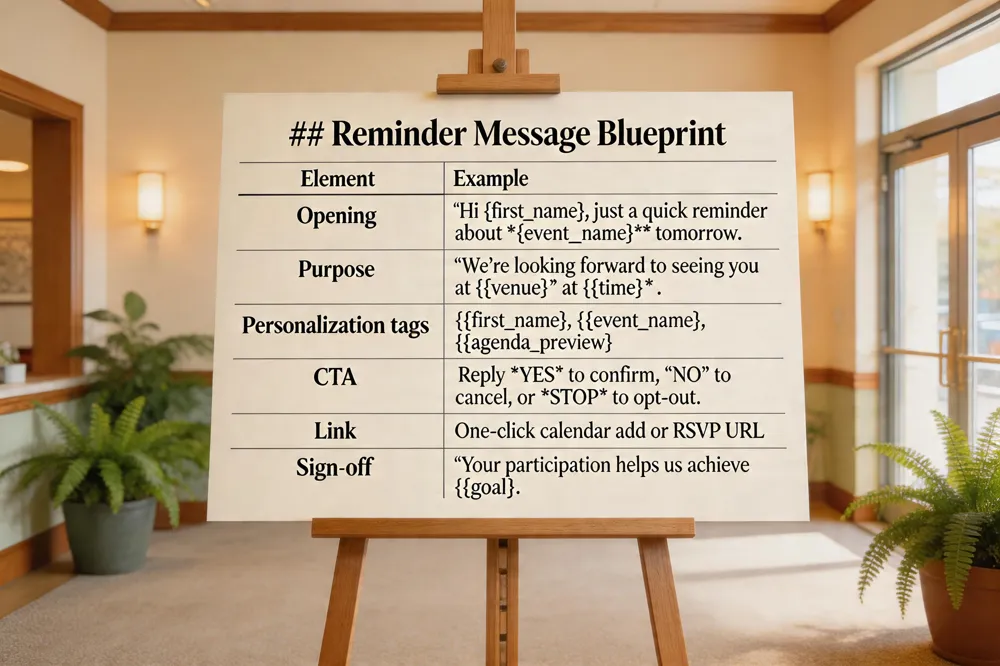
A friendly opening works best—think a line like “Just a quick reminder about [event/meeting] tomorrow.” Follow with a clear purpose: “We’re looking forward to seeing you at [venue] at [time].” Personalization tags (first name, event title, agenda preview) boost open rates, which hover around 98 % for SMS and cut no‑shows by up to 30 % (Evant, Salesmsg). Keep the message concise so it fits in one text bubble, then add a clear call‑to‑action: “Reply ‘YES’ to confirm, ‘NO’ to cancel, or ‘STOP’ to opt‑out.” Include a one‑click calendar link or RSVP URL to make attendance frictionless—studies show a single click can raise RSVP conversion by 20‑25 %. End with a polite sign‑off and a reminder of the benefit: “Your participation helps us achieve [goal].” Using multi‑channel timing (1 day and 1 hour before) and real‑time analytics lets you tweak wording and send windows, continuously improving engagement and reducing cancellations.
Timing and Sequencing for Maximum Impact
1. Strategic reminder intervals
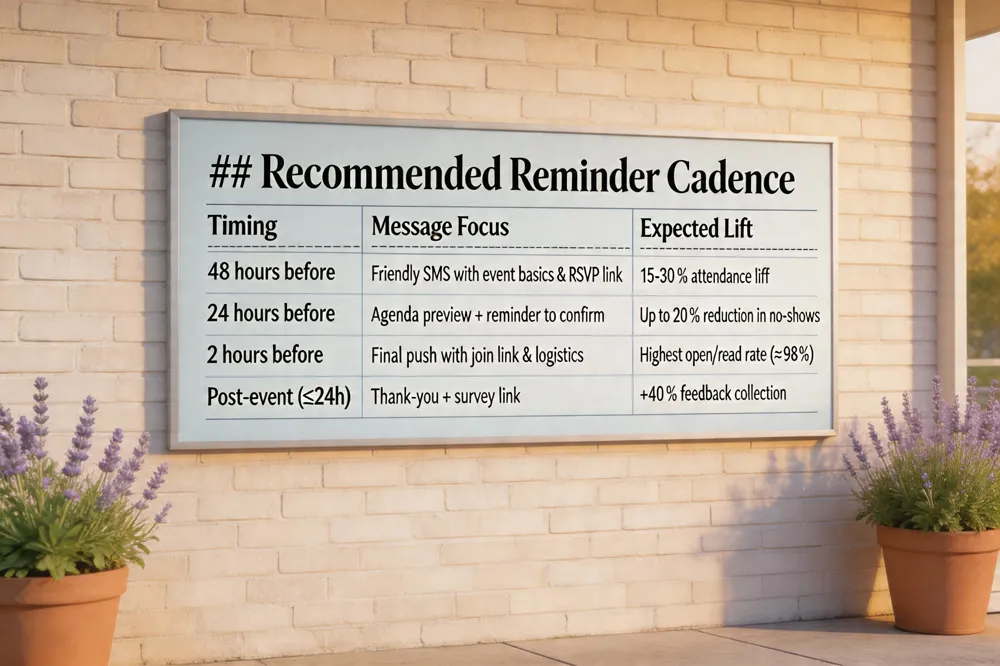
- 48 hours before – A friendly SMS that says, “Hey [First Name], [Event Name] is coming up on [Date] at [Time]. Tap to RSVP [Link]”. This is the sweet spot for a first nudge; studies show a 15‑30 % attendance lift when the first reminder lands a day or two ahead.
- 24 hours before – Keep the momentum with a concise “24 hours left! Confirm your spot and view the agenda [Link]”. Adding a brief agenda preview bumps perceived value and cuts no‑shows by up to 20 %.
- 2 hours before – A last‑minute “We’re ** – join via this link [Link]”. SMS open rates sit at 98 % and are read within minutes, making this the most effective final push.
- Post‑event (within 24 hours) – A thank‑you text with a short survey link drives feedback collection up to 40 % compared with manual follow‑ups.
2. Trigger‑based automation
Instead of sending the same message to everyone, trigger reminders based on attendee actions:
- Registration confirmed → immediate confirmation SMS.
- No RSVP after 48 hours → a gentle “Did you forget to confirm? Reply YES to lock your seat.”
- Payment completed → a “Your ticket is secured! Here’s your QR‑code for check‑in.”
- Check‑in pending → a 2‑hour‑before reminder that includes a one‑click calendar add‑on and parking instructions. These triggers align the communication with the attendee’s journey, reducing friction and boosting response rates by up to 25 %.
3. The 5 C’s framework applied to reminders
| C | What it means for reminders |
|---|---|
| Concept | Craft a clear value proposition in each text – “Learn three new fundraising tactics.” |
| Coordination | Sync your SMS platform (e.g., Evant, Twilio, SalesCloser.ai) with your CRM (Salesforce, HubSpot) so every reminder pulls the latest attendee name, location, and agenda. |
| Control | Monitor open, click‑through, and RSVP rates in real‑time dashboards; adjust timing or copy on the fly if a reminder under‑performs. |
| Culmination | The final 2‑hour reminder should include a link to the virtual room or venue map, ensuring attendees know exactly where to be. |
| Closeout | After the event, send a concise thank‑you with a survey link and a teaser for the next gathering – this completes the loop and fuels repeat attendance. |
4. Quick answers to your key questions
How do you remind people to attend an event? Send a personalized SMS that starts with the attendee’s name, states the event name, date, time, and location, and ends with a clear CTA like “Reply YES to confirm” or a short RSVP link. Schedule the first reminder 48 hours out and a final nudge 2 hours before. Track responses in your CRM and follow up with a friendly “We’re looking forward to seeing you!” for anyone who hasn’t confirmed.
How to make reminders more effective? Make each reminder clear, actionable, and multi‑channel. Use SMS for instant reach, email for detailed agendas, and voice calls for high‑value donors. Personalize with name, event specifics, and any last‑minute logistics (parking, dress code). Tie reminders to triggers—registration, payment, or calendar alerts—so they arrive exactly when the attendee can act. Include a simple CTA and a one‑click RSVP or calendar‑add link to reduce friction.
What are the 5 C’s of an event?
- Concept – The core idea and audience.
- Coordination – Aligning resources, vendors, and schedules.
- Control – Monitoring execution and managing risks.
- Culmination – The peak moment delivering the promised experience.
- Closeout – Post‑event thank‑you, surveys, data analysis, and planning the next event.
By marrying strategic intervals, trigger‑based automation, and the 5 C’s mindset, nonprofits and educational groups can cut no‑shows by up to 72 % and lift attendance by 20‑30 %—all while freeing staff to focus on content, not manual reminders. The result? Fuller rooms, richer engagement, and a community that keeps coming back for more.
Tools and Platforms for Automation
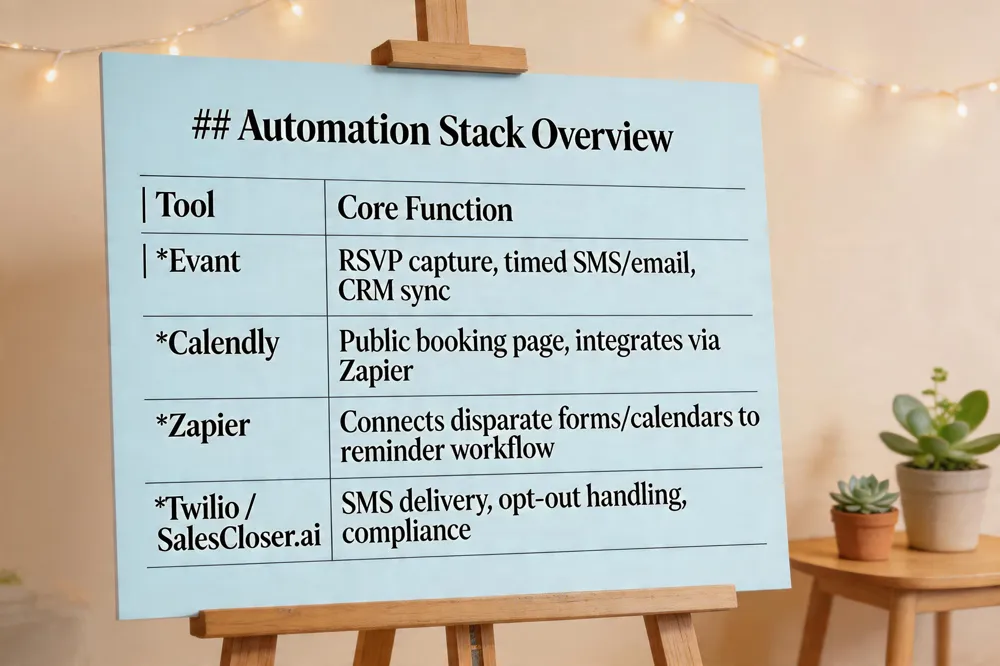 When you’re juggling dozens of workshops, a reliable automation stack is the difference between a full house and a half‑empty room. Evant’s built‑in scheduling engine does the heavy lifting: it captures RSVPs, triggers timed SMS or email nudges, and syncs every response back to the platform’s CRM for instant segmentation. If you need a public booking page, pair Calendly (or Zapier‑linked Doodle/When2meet) with Evant; the booking link feeds straight into the reminder workflow, so no manual data entry is required.
Which tool is helpful for automated scheduling and reminders? Evant’s scheduler is the core engine for nonprofits and schools, handling RSVP collection, custom‑interval reminders, and CRM‑driven follow‑ups. Calendly adds a user‑friendly front‑end, while Zapier bridges any other calendar or form tool into the same flow.
How to create an event reminder? 1️⃣ Open the event in Evant, click “Create Reminder.” 2️⃣ Set the send time (e.g., 24 hours before) and choose SMS. 3️⃣ Draft a concise message with {{first_name}}, event details, and a CTA like “Reply YES to confirm.” 4️⃣ Add a calendar‑add link if desired, preview, then activate.
How can you set a reminder for a specific automation? Go to Settings → Automation → Automated Reminders, hit “+Reminder,” name it, pick the trigger (e.g., 24 hours before), select the target group, insert dynamic placeholders, define any extra conditions, save and enable. The reminder now fires automatically whenever the automation criteria are met.
Channel Strategy: SMS, Email, Voice
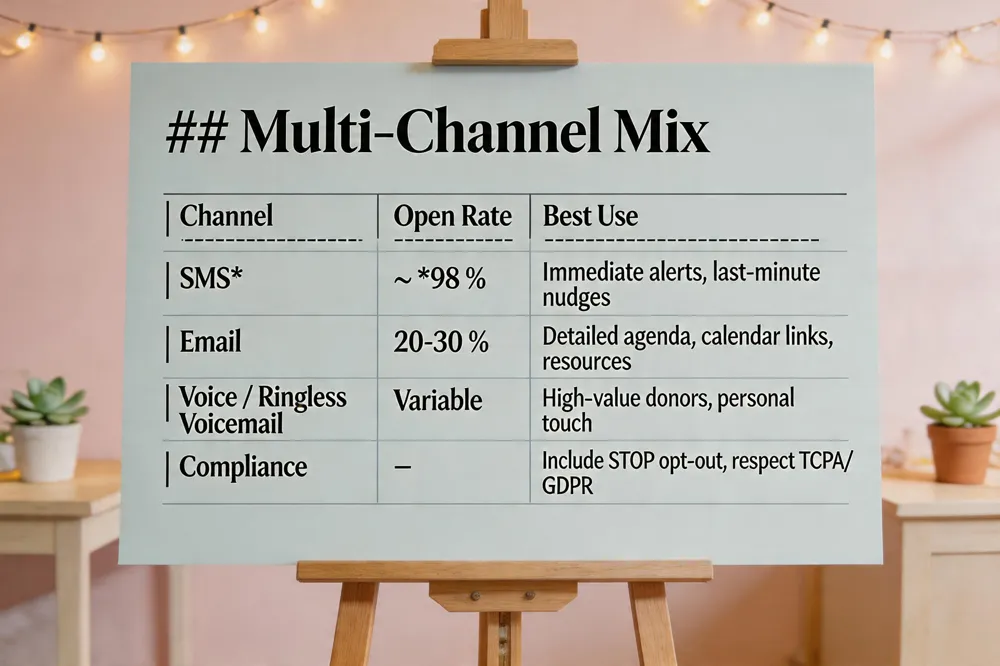 SMS reminders boast a 98% open rate—far outpacing typical email’s 20‑30%—making them the fastest way to reach attendees. Pairing SMS with email and voice calls creates a multi‑channel safety net: SMS catches last‑minute decision‑makers, email delivers richer details and calendar links, and voice or ringless voicemail reaches those who prefer a more personal touch. Compliance is non‑negotiable; every message must include a clear opt‑out (e.g., reply STOP) and respect TCPA consent rules, which platforms like Evant and Twilio handle automatically.
SMS reminders for event attendees examples
- “Hi [Name], just a friendly reminder that [Event] is tomorrow at [Time] in [Venue]. Reply YES to confirm your spot!”
- “Good morning, [Name]! We’re excited to see you at [Event] today at [Time]. Need directions? Text HELP for a map.”
- “Last chance to RSVP for [Event] on [Date] at [Time]. Reply STOP to opt out or YES to lock in your place.”
SMS reminders for event attendees template “Hi [FirstName], this is [YourOrganization] reminding you about [EventName] on [Date] at [Time] at [Location]. Reply YES to confirm, NO to decline, or STOP to opt out.”
Event reminder email examples
- 48‑hour: Subject “Reminder: [Event] on [Date] – Your spot is saved”. Body includes agenda preview and RSVP link.
- 24‑hour: Subject “Don’t miss out – [Event] is tomorrow!”. Body adds map, checklist, and one‑click calendar add.
- Day‑of: Subject “Today’s the day – [Event] details inside”. Body provides check‑in link and speaker highlights.
Post‑Event Follow‑Up and Ongoing Engagement
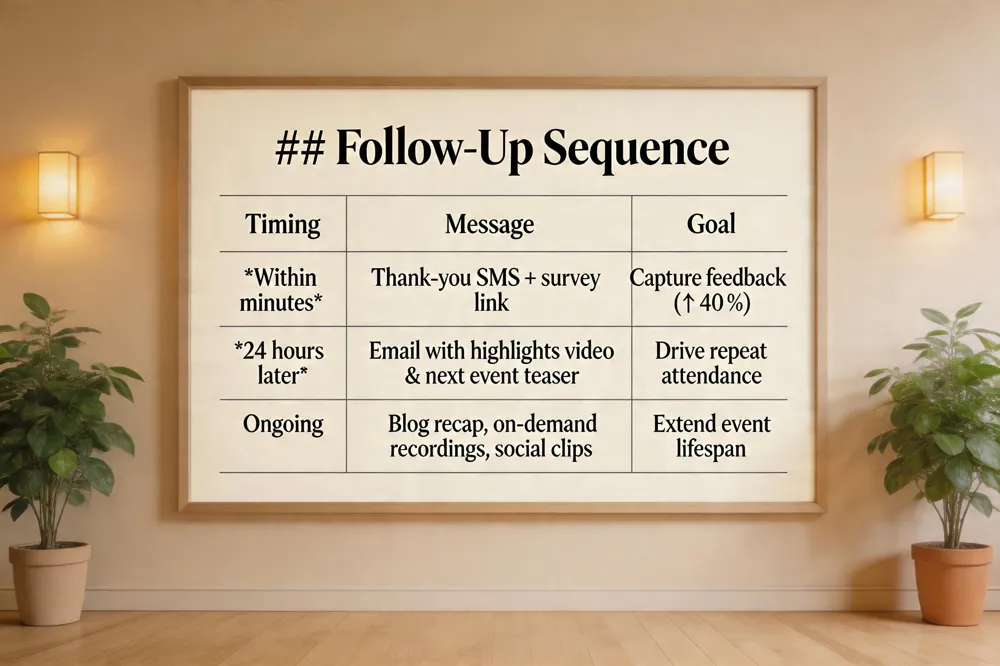 Automated follow‑up messages after an event (e.g., thank‑you texts and survey links) – Within minutes of the event wrap‑up, fire a personalized SMS that says, “Thanks for coming, [First Name]! We’d love your feedback – tap here for a quick 2‑minute survey.” Studies show Automated follow‑up messages after an event (e.g., thank‑you texts and survey links) improve post‑event feedback collection by up to 40% compared with manual follow‑ups and keep the conversation alive. Include a short link or QR code so attendees can answer on the spot.
Repurposing event content—through blog recaps, on‑demand video recordings, social‑media clips, and a centralized resource center—extends the event’s lifespan – Your event is a gold mine. Repurposing event content—through blog recaps, on‑demand video recordings, social‑media clips, and a centralized resource center—extends the event’s lifespan. A 24‑hour thank‑you email with a “Watch the highlights” button drives repeat engagement and gives non‑attendees a taste of what they missed, nudging them toward the next event.
Analytics dashboards track delivery rates, open rates, and response metrics – Use the platform’s dashboard to track SMS open rates (often >98 %), click‑throughs, and survey completions. Compare metrics across reminder cadences—e.g., 7‑day vs. 24‑hour alerts—to see which timing cuts no‑shows the most. Feed these insights back into your next reminder sequence for a data‑driven boost in attendance.
Analytics, Compliance, and Continuous Optimization
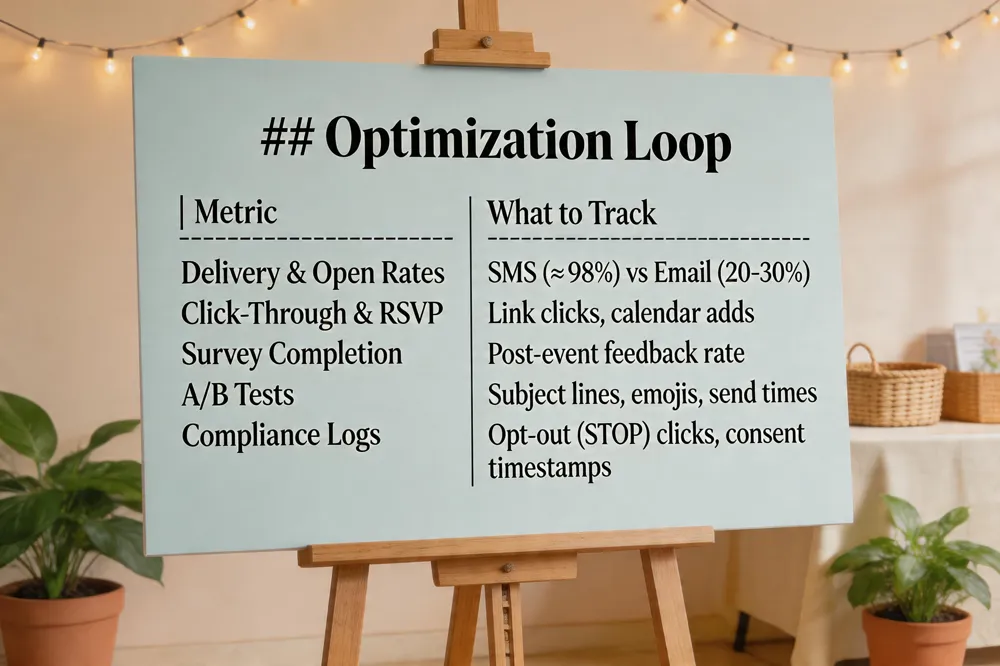 Real‑time metrics show delivery, opens, clicks, and replies instantly, letting organizers adjust before the next event.
Compliance: TCPA and GDPR require clear opt‑out links; automated workflows add STOP and log consent.
A/B testing of subject lines, emojis, and send times reveals the highest attendance lift.
What are automated email sequences? An automated email sequence is a set of pre‑written emails that are sent to a contact automatically according to a defined schedule or triggered by specific actions (such as signing up, RSVP, or checking in). The workflow is built once in a marketing‑automation or CRM platform, which then delivers each message at the right time without manual effort. Because the sequence can react to user behavior—like opening a previous email or completing a task—it provides personalized, timely communication that nurtures leads, confirms attendance, or follows up after events. This automation saves staff time, ensures consistent messaging, and helps increase engagement and conversion rates. In short, it’s a repeatable, rule‑based email campaign that runs on its own once activated.
Putting It All Together
Pulling all the pieces together means treating reminders as a single, multi‑channel orchestra instead of isolated emails, texts, or calls. Choose a platform that can fire SMS, email, and voice alerts from the same workflow, tag each touchpoint with the attendee’s name, agenda snippet, and a calendar link, then let the system schedule the 7‑day, 1‑day, and 1‑hour nudges automatically. Track delivery, open, and click‑through metrics in time so you can see exactly how each reminder moves a registrant from “maybe” to “confirmed.” The data dashboard should surface no‑show rates, response times, and ROI, letting you tweak timing or copy on the fly. By building a future‑ready stack—API‑driven, GDPR‑compliant, and integrated with your CRM—you lock in a process that scales across churches, schools, and nonprofits.