
Comparing SMS RSVP Tools to Traditional Methods: What You Need to Know
Why SMS Is Redefining Event Planning
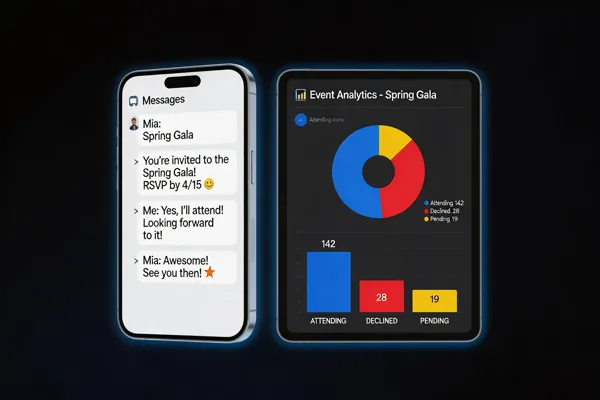
Switching from paper RSVP cards to mobile‑first SMS invites transforms event logistics. Text messages reach 98 % of U.S. adults instantly, while email opens hover at 20‑30 % and postal mail can be delayed or lost. Real‑time replies let organizers update headcounts instantly, cutting manual transcription errors and labor by up to 40 %. SMS reminders boost confirmed attendance by 10‑20 % and reduce no‑shows by 15 % compared with email‑only prompts. Built‑in compliance tools handle TCPA, CCPA and GDPR opt‑in tracking, encrypt data in transit, and provide audit trails, safeguarding guest information without extra effort. These efficiencies free staff to focus on outreach and donor work.
The Power of SMS RSVP for Small Organizations
Cost savings and staff‑time reduction SMS RSVP cuts printing, postage and manual data‑entry costs. U.S. nonprofits save $1,200‑$1,800 on staff time for a 200‑guest event and pay only $0.01‑$0.03 per text, far cheaper than $0.75‑$2 per paper invitation.
Real‑time response tracking Responses appear instantly in a centralized dashboard, giving organizers up‑to‑date headcounts and the ability to adjust catering or seating on the fly.
Compliance with CCPA, TCPA, and GDPR Most platforms embed opt‑in management, consent logs and encryption, meeting US privacy laws and GDPR without extra paperwork.
Features that make SMS ideal for nonprofits and schools Two‑way texting, automated reminders, QR‑code check‑in, and CRM sync keep engagement high and data clean.
Event management software for small business Small‑business platforms must be intuitive, affordable, and handle RSVP to post‑event reporting. Evant’s SMS‑based system captures guest responses instantly, offers real‑time check‑in, targeted messaging, and simple analytics—all on a scalable SaaS subscription.
What is an SMS tool? A software platform that sends, receives and manages bulk text messages, provides two‑way communication, scheduling, automation and analytics, and integrates with CRMs for personalized outreach.
What is SMS check‑in? Participants confirm attendance by texting a keyword or scanning a QR code that triggers a text. The reply logs instantly, eliminating paper sign‑ins and updating guest lists in real time.
What is a good RSVP system? It is intuitive, updates headcounts instantly, syncs with seating and check‑in, offers custom questions, automated reminders, analytics, and seamless CRM integration for a frictionless workflow.
Top SMS RSVP Platforms and Features
Leading tools for nonprofits and schools include Evant, SimpleTexting, Twilio Studio, and Eventbrite’s SMS add‑on. Evant provides built‑in SMS RSVPs, instant check‑ins, real‑time analytics, and seamless CRM sync, making it ideal for community‑focused organizations. SimpleTexting offers mass‑text campaigns with automated reminders and response tracking, while Twilio Studio lets tech‑savvy teams craft custom SMS flows that feed directly into existing databases. Eventbrite’s SMS add‑on adds text‑based RSVPs to its robust ticketing platform, letting organizers manage tickets and communications in one place.
Other platforms comparable to Eventbrite: SimpleTix delivers ticketing with SMS reminders for educational events; TicketSpice offers low‑fee, white‑label ticketing and mobile check‑in tools; Ticket Tailor provides flat‑fee pricing and full branding control; Whova adds an event‑app with badge printing and networking features. All these solutions support CRM integration, analytics dashboards, and scalable pricing—from $0.01‑$0.05 per message to subscription plans of $30‑$150 per month—helping nonprofits reduce staff hours, improve data accuracy, and boost attendance.
Real‑Time Check‑In and QR Code Integration

SMS event check‑in apps let attendees confirm arrival with a single keyword or short code sent to a dedicated number. The response is captured instantly, updating the live guest list and triggering automatic thank‑you or follow‑up messages. Because SMS works on any mobile device and in low‑bandwidth areas, it eliminates the need for paper lists or separate QR‑code scanners, streamlining staffing for nonprofits and schools.
How to use QR code for event check‑in?
- Generate a unique QR code for each guest when they RSVP via SMS or the portal.
- Deliver the code to the attendee’s phone or embed it on printed tickets.
- At the venue, open the mobile check‑in app or a compatible scanner and scan each code as guests arrive.
- The system validates registration, marks the guest as checked‑in, logs the time, and updates real‑time dashboards.
- Use built‑in analytics to monitor check‑in rates, spot no‑shows, and produce post‑event reports for future planning.
Analytics and reporting tools from SMS‑based platforms provide instant metrics on attendance, engagement, and demographic breakdowns, giving event organizers actionable insights while reducing manual data entry errors.
Best Practices for Crafting RSVP Messages

Tone and clarity are essential for community‑focused events; keep language friendly, concise, and on‑brand—formal for galas, casual for workshops. Effective wording for SMS should start with a greeting, state the event name and date, and give a clear deadline. Use simple reply options (YES/NO, plus‑one count) and a brief space for special notes such as dietary restrictions. Prompting quick replies works best when you embed a sense of urgency and benefit: "Your response helps us reserve your seat and plan a smooth event."
What is the proper way to RSVP? Reply via the same channel used for the invitation—paper mail for mailed invites, email for email invites, SMS or messaging app for digital invites—by the deadline, using clear yes/no and guest count.
RSVP wording – "Hi [Name], you’re invited to our [Event] on [Date] at [Time]. Please reply YES or NO by [Deadline] so we can reserve your seat. Thanks!"
RSVP text example – "Hi [Host], I’ll be attending on June 5. Let me know if I should bring anything. – [Your Name]"
Nice way to say please RSVP – "We’d be thrilled to have you—please reply “Yes” or “No” before [date] so we can plan a great gathering. Thanks for helping us succeed!"
Wedding‑Specific RSVP Strategies
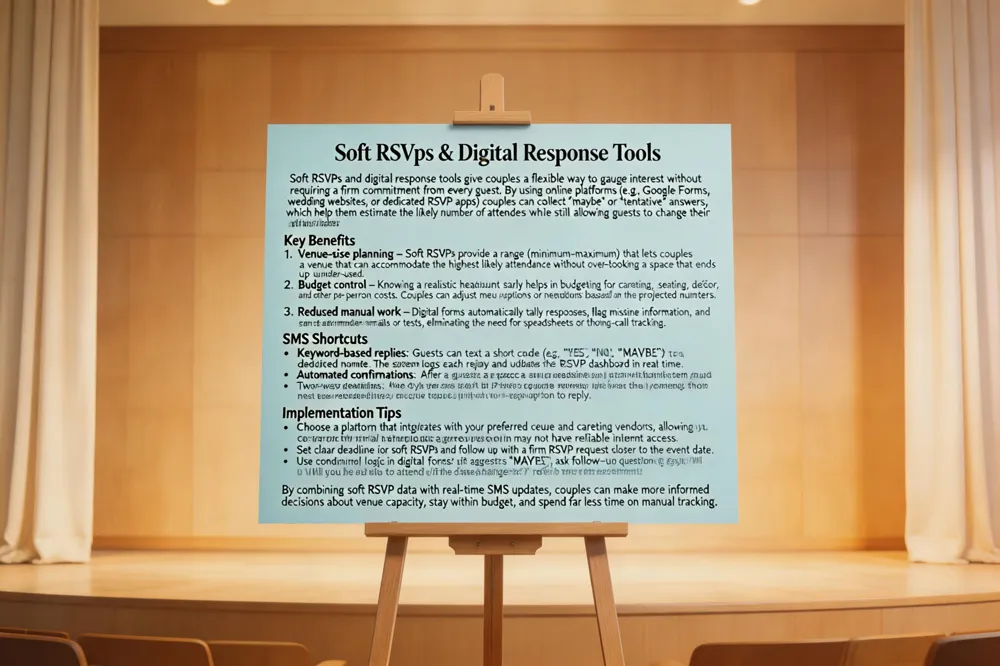
A soft RSVP is an informal “heads‑up” sent six to eight months before the official invitation, asking guests to indicate likely attendance without a formal acceptance. This early feedback helps couples secure appropriate venue size, arrange hotel rooms, and budget catering, often appearing on save‑the‑date cards or a simple online form with options like “most likely yes,” “maybe,” or “most likely no.”
Many couples now replace the traditional paper RSVP card with digital alternatives. A short link to an online RSVP form, an email reply, or a text‑to‑RSVP number let guests confirm instantly. SMS responses cost $0.01‑$0.03 per message, have 98% open rates, and sync in real time with guest‑list management tools, eliminating manual data entry and postage expenses.
To RSVP by text, open a new message to the number on the invitation, reply with “YES” or “NO” and include guest names and plus‑ones (e.g., “YES, John & Jane +2”). Follow any automated prompts for meal choices or dietary restrictions and send before the deadline. Keep a copy of the text for your records.
Comparing Costs, Compliance, and Engagement

SMS RSVPs achieve 98% open rates and 85‑95% response confirmation within 24 hours, far outpacing email (20‑30% open) and paper (10% open). Per‑message costs range from $0.0075 to $0.05, compared with $0.75‑$2 per mailed invitation and $0.01‑$0.03 for postage, delivering a clear budget advantage. Automated platforms embed CCPA, TCPA, and GDPR safeguards—opt‑in logs, consent trails, and encryption—while manual spreadsheets lack these protections.
RSVP wording Start with a friendly greeting and the event name, then ask guests to confirm their attendance. Include a clear deadline and simple reply options such as “Yes” or “No,” and, if applicable, a space for a plus‑one or special notes. Keep the tone consistent with your organization’s brand—formal for a gala, casual for a community workshop. Example SMS: “Hi [Name], you’re invited to our [Event] on [Date] at [Time]. Please reply YES or NO by [Deadline] so we can reserve your seat. Thanks for helping us plan a great event!”
What is a good RSVP system? A good RSVP system is intuitive for both organizers and guests, letting people confirm attendance with just a few clicks or a quick text message. It updates headcounts in real time and syncs that data with seating charts, event check‑ins, and any related communications so you always have an accurate view of who’s coming. Robust customization—such as custom questions, tags, and branding—lets you collect the exact information you need, from meal preferences to volunteer roles. Automated reminders and follow‑up messages keep response rates high without manual effort, while built‑in analytics help you track engagement and make data‑driven decisions. Finally, seamless integration with your CRM, ticketing, or payment platforms ensures that the RSVP workflow fits smoothly into your overall event management process.
Choosing the Right RSVP Strategy for Your Event
SMS RSVP tools deliver invitations instantly and capture replies, giving organizers a 98% open rate and 70‑90% response rate versus 20‑30% for email and 30‑50% for paper cards. Two‑way communication cuts data entry, lowers no‑show rates by up to 15 % and reduces staff labor by 30 % or more. Text messages work on phones, reaching audiences with internet access and complying with TCPA, CCPA and GDPR out‑of‑the‑box. Test a few platforms with a pilot batch, compare delivery analytics and cost per message, then scale one that fits your budget and workflow. Evant’s all‑in‑one suite combines SMS RSVP, reminders, CRM sync and dashboards, offering a turnkey solution for nonprofits and educational events.
Related Blogs

Got Kicked Out of GroupMe? Look to Evant.
Michael PedoeemGot Kicked Out of GroupMe? The Best GroupMe SMS Alternative for Jewish Communities

How to Send Targeted Alerts During Live Events
Michael PedoeemMastering Targeted Event Alerts: Real-Time Communication Strategies for Nonprofits
Top 7 SMS Trends for Communities in 2026
Michael PedoeemFrom AI-powered responses to text-to-donate and two-way texting — here are the 7 SMS trends every shul, school, and nonprofit needs to know about in 2026