Website Message Widget
Paste one embed code on your website and visitors can message you right from the page. Their messages land in a Widget tab in your Evant Inbox, kept apart from your regular text threads, along with the email or phone number they left so you can write back. It's included on every plan.


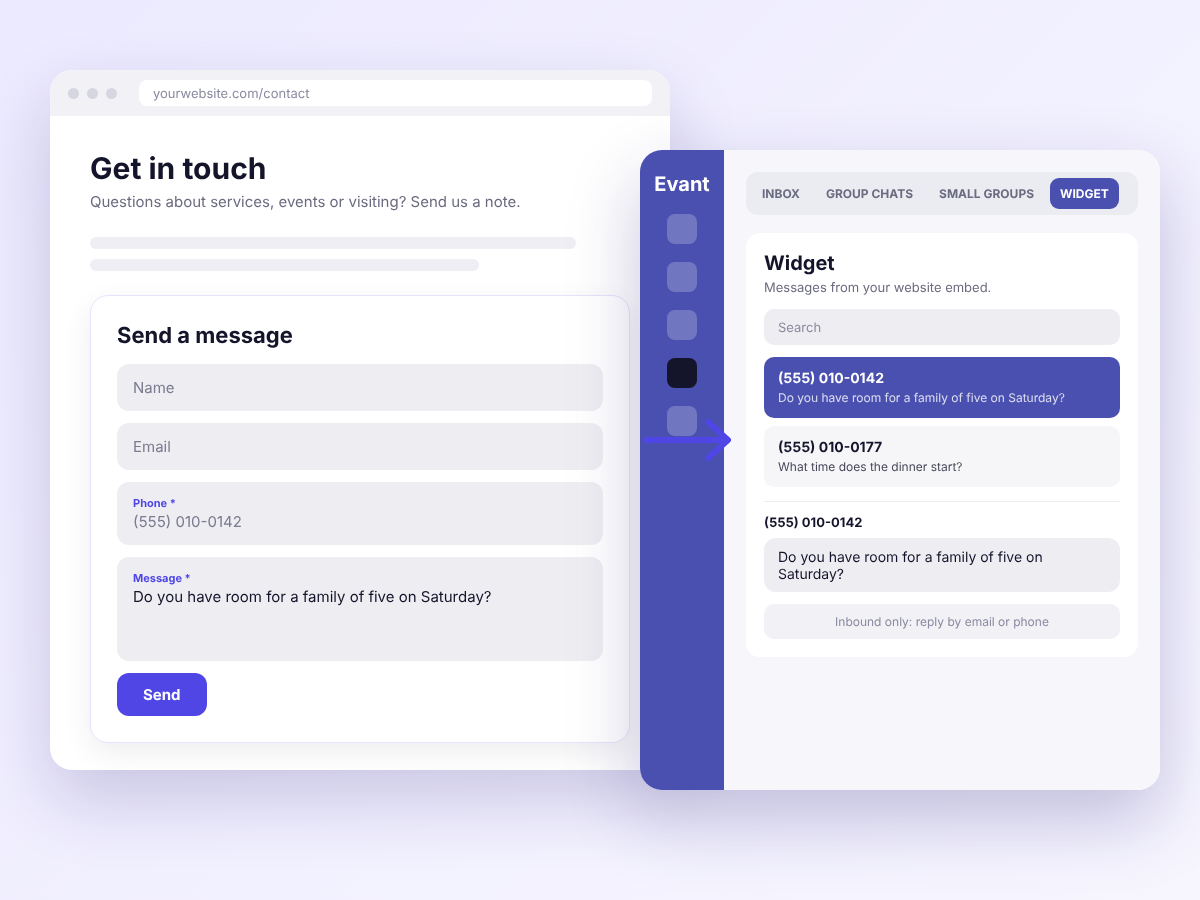
How the Website Widget Works
Copy the code, paste it on your site, and every message from a visitor shows up in your dashboard. No app for your visitors to download.
Pick what you need from visitors
Open the Widget tab in your Evant Inbox and choose Embed code. Then decide what a visitor has to leave: an email, a phone number, or both.
Paste the code on your site
The widget is a small iframe. Copy it and paste it into any page where you can add HTML, like a contact page, a footer or a community page. Link your privacy policy right next to it, so visitors know how you'll use what they send.
title="Evant Widget"
width="100%" height="560"
loading="lazy"></iframe>
Messages land in the Widget tab
Visitors type a message and hit Send. It shows up in your dashboard under Widget, next to Inbox, Group Chats and Small Groups, not mixed in with your text threads.
What your visitors see
A simple form on your page. They add a message and the contact info you asked for, then press Send.
Send a message
Example form. Which fields are required is up to you.
What you see
Each visitor gets a thread in the Widget tab with their message, the time it came in and the contact details they left. You can search them, too.
Example inbox. The Widget tab is inbound only, so you reply by email or phone using the contact details.
What you get with the widget
You choose the contact info
Require an email, a phone number, or both before a visitor can send.
Its own tab
Website messages sit in a Widget tab, apart from your regular Inbox threads.
One embed code
Copy it from the dashboard and paste it into your site. It loads as the page loads, so it stays light.
Search your messages
Look up a visitor by name, number or what they wrote.
On every plan
The website widget is included on every Evant plan.
Put a message box on your website
Visitors get an easy way to reach you. You get every message in the same dashboard you already use.
Website Widget FAQ
What is the Evant website widget?
It is a message form you embed on your website with one piece of code. Visitors type a message, leave their contact info and press Send. The message arrives in the Widget tab of your Evant Inbox.
Which plans include the website widget?
Every Evant plan includes it.
Where do I find the embed code?
In your Evant dashboard, open Inbox, go to the Widget tab and choose Embed code. Pick whether to require an email, a phone number or both, then copy the code.
Where do website messages show up?
In the Widget tab of your Inbox. It sits beside Inbox, Group Chats and Small Groups, so website messages stay separate from your regular text threads.
Can I reply to a visitor from the Widget tab?
Not from the tab itself. It is inbound only. Each message shows the email or phone number the visitor left, so you reply by email or phone.
Does the widget collect permission to text visitors?
No. The widget collects the message and the contact info you choose to require. It does not send any texts. If you plan to text a visitor back, make sure you have their permission first.
Should I link my privacy policy near the widget?
Yes. The widget collects names, emails and phone numbers, so we recommend linking your privacy policy on the same page, close to the widget.
Will it work on my website?
The widget is an iframe, so it works on any site or page builder that lets you paste HTML into a page.
Do my visitors need an account or an app?
No. They type a message into the form on your page and press Send.
You’ll be in good company …..







Your community is one text away.



Get the Evant app



